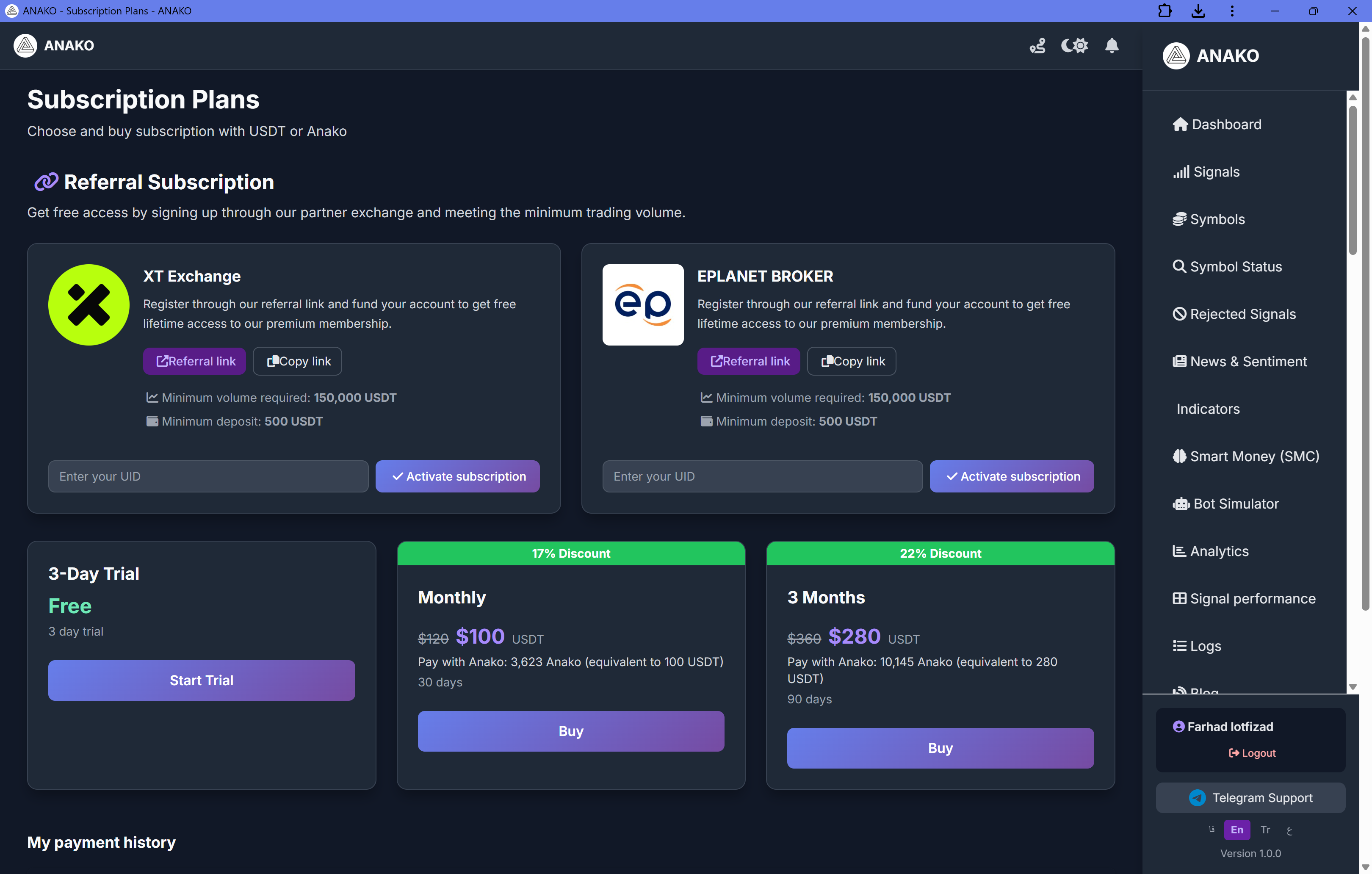
In this section, users can activate their subscription to use the ANAKO AI Trading System platform. This subscription provides full access to AI signals, automated trading execution, and advanced analytical tools.
Types of Subscription Activation Methods
The ANAKO platform offers three methods for subscription activation:
-
Using the exchange referral link
-
Purchasing subscription with USDT
-
Payment with ANAKO token
Referral Subscription — Subscription via Exchange
Users can register on ANAKO partner exchanges via a referral link to receive a free subscription.
Currently supported exchanges include:
-
XT Exchange
-
Eplanet Broker
Conditions for Activating Free Subscription
To activate the subscription, the following conditions must be met:
-
Register via the referral link
-
Deposit at least 500 USDT
-
Achieve a minimum trading volume of 150,000 USDT
After fulfilling these conditions, users can enter their exchange UID and activate the subscription.
Trial Plan — Trial Period
New users can take advantage of a 3-day free trial period.
This period allows users to:
-
Review the ANAKO signaling system
-
Observe the automated trading performance
-
Evaluate the quality of analyses
No initial payment required.
Monthly Subscription — Monthly Subscription
Monthly subscription price:
100 USDT
Access duration:
30 days
Users can pay for this subscription using two methods:
-
USDT
-
ANAKO Token
Payment with ANAKO token is equivalent to:
3624 ANAKO
.
3-Month Plan — Three-month Subscription
Price of this plan:
280 USDT
Access duration:
90 days
If paid with ANAKO token:
10145 ANAKO
is required.
Subscription Payment Section — Subscription Payment
Users can pay for the subscription using two methods.
Payment with USDT
Network:
TRC20
Users must:
-
Send the specified amount of USDT to the displayed address
-
Register the transaction ID (TXID) in the system
-
Submit the payment request
After transaction confirmation, the subscription will be activated.
Payment with ANAKO Token
Users can also pay for their subscription with ANAKO tokens.
In this method:
-
ANAKO tokens are sent via the TON network
-
A wallet address will be displayed
-
User registers their TON wallet address
The system will activate the subscription after verifying the transaction.
Payment History Section — Payment History
In this section, users can view their payment history.
Displayed information includes:
-
Plan type
-
Amount paid
-
Payment status
-
Date
-
Transaction ID