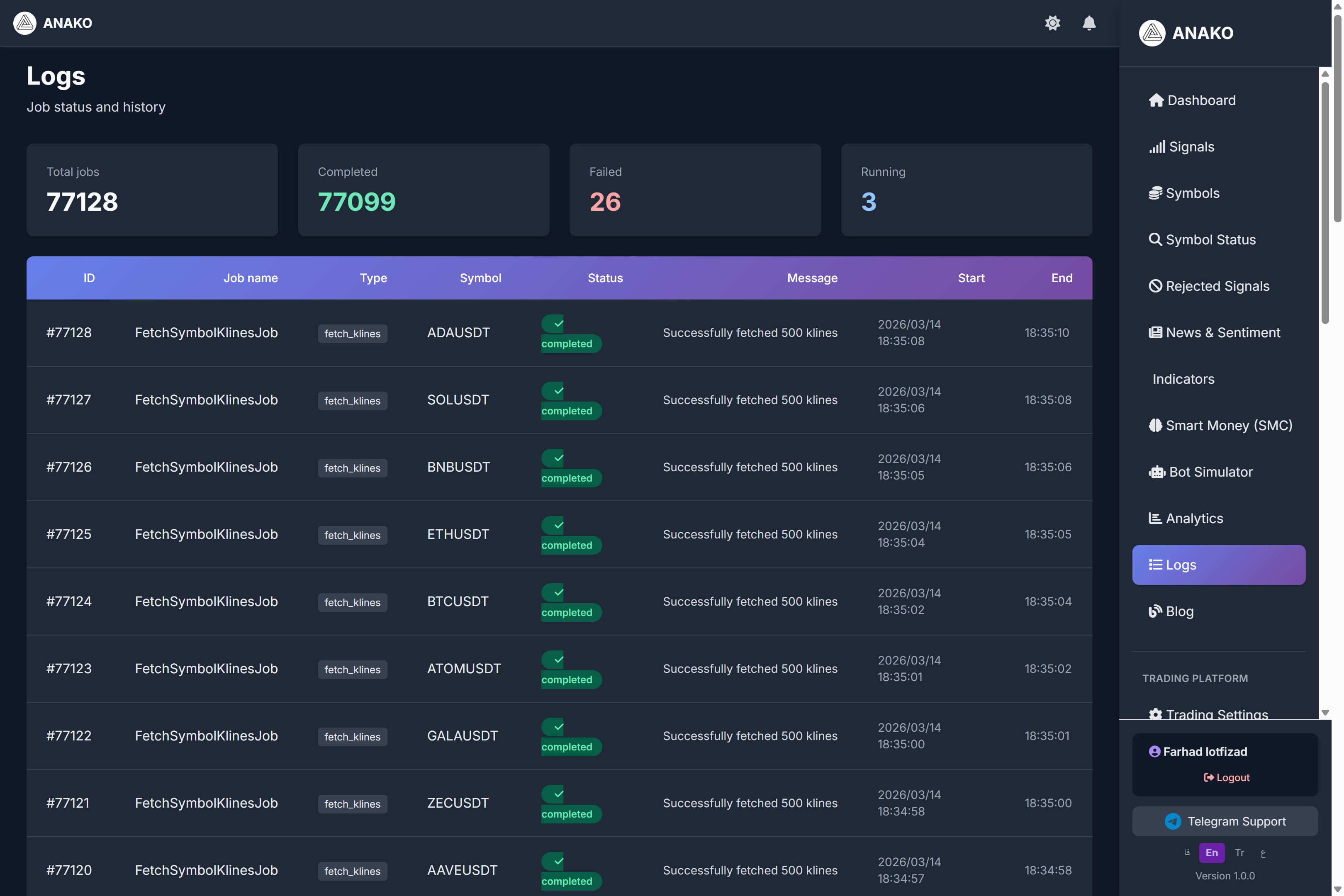
In analytical and artificial intelligence systems, one of the most important parts is recording and reviewing system activities. This information is stored in the form of Logs.
In the ANAKO AI platform, the Logs section is designed to display the history of system activities. This section helps users and system administrators review the internal performance of the platform.
What are Logs?
Logs are actually the precise recording of activities performed in the system.
Every time the system performs an operation, information related to that operation is stored in the form of a Log.
This information can include the following:
Market data acquisition
Running analyses
Generating signals
Updating symbol information
Overall System Activity Statistics
Several key metrics are displayed at the top of the page.
Total Jobs
The total number of operations performed by the system.
Example:
77128 operations
This number indicates that the system is continuously processing market data.
Completed Jobs
The number of operations successfully completed.
Example:
77099 successful operations
This indicates the stable performance of the system.
Failed Jobs
The number of operations that encountered errors.
Example:
26 operations
In every software system, the possibility of errors exists, but a low number of errors indicates proper system performance.
Running Jobs
Operations that are currently running.
Example:
3 running operations
This indicates the system is processing new market data.
Activity Table
In the main section of the page, a list of the latest operations performed is displayed.
Each row contains the following information:
Operation ID
Job name
Operation type
Trading symbol
Execution status
System message
Start time
End time
Example of an Operation
A sample operation is shown in the image.
Job name
FetchSymbolKlinesJob
This operation relates to fetching market candle data.
Symbol
ADAUSDT
Status
Completed
Message
Successfully fetched 500 klines
This message indicates that the system successfully fetched 500 market candles.
Why are Logs Important?
Having a logging system has important advantages.
Logs help:
Review system performance
Identify potential errors
Record activity history
Increase system transparency
In professional systems, logs are one of the most important tools for system management and maintenance.
The Role of Logs in the ANAKO Platform
In the ANAKO platform, logs show that the system is continuously processing market information.
These processes include the following:
Receiving price data
Updating analyses
Executing signal algorithms
Recording analysis results
This ensures users that the system is continuously analyzing the market.