Introduction
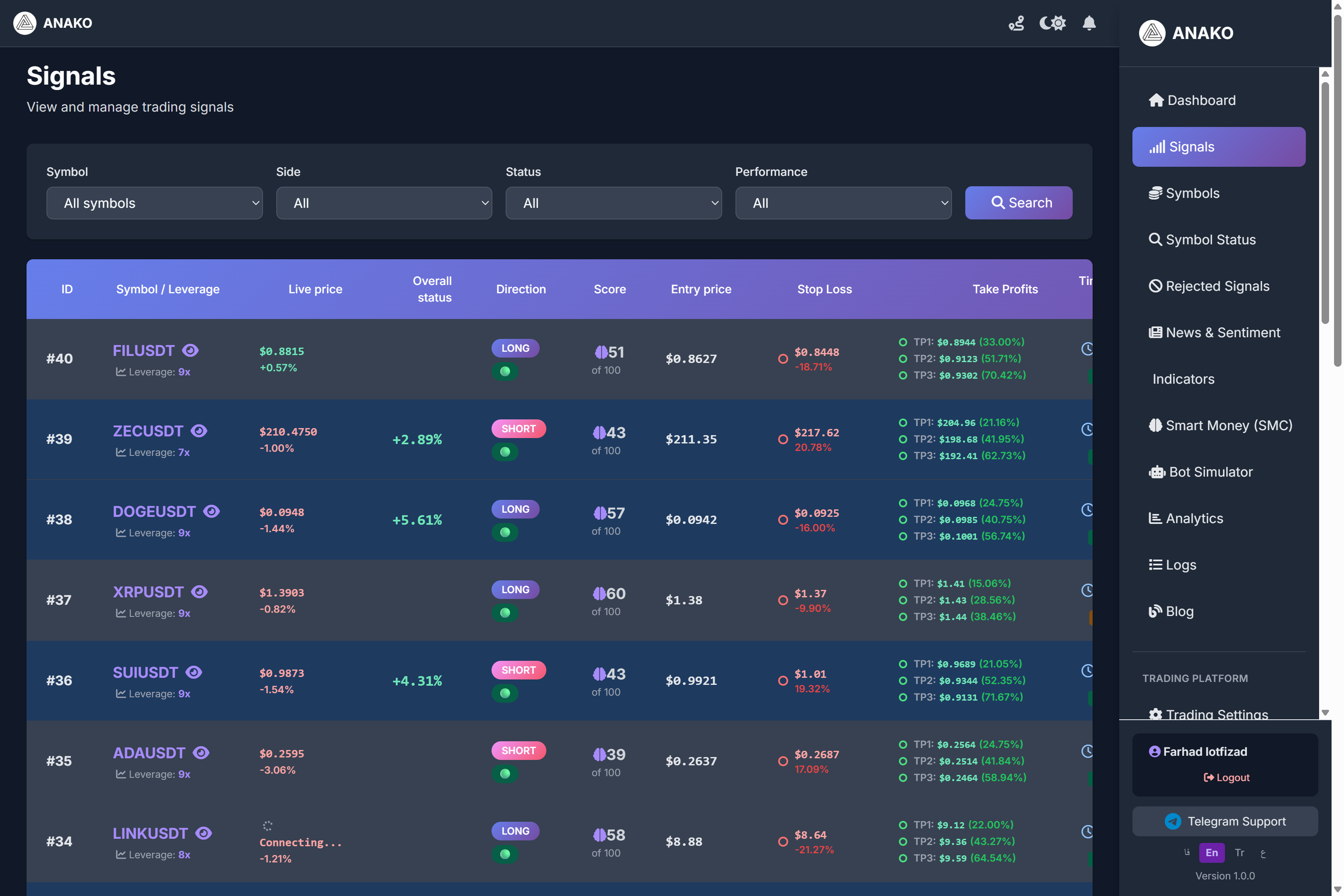
The signal system on the ANAKO AI platform is one of the most important tools for crypto and forex traders. This section generates trading signals using technical analysis algorithms, market data, Smart Money analysis, and market sentiment.
On this page, users can view active signals, entry price, stop loss, and price targets and use them for trading decisions.
Filtering Signals
At the top of the page, there are several filters that help users find their desired signals.
Symbol
Here you can select the trading symbol.
Example:
BTCUSDT
ETHUSDT
XRPUSDT
Side
Specifies the trade direction.
LONG
SHORT
If you select LONG, only buy signals will be displayed.
Status
Shows the signal status.
For example:
Active
Closed
Hit TP
Hit SL
Performance
In this section, you can filter signals based on their performance.
Information of Each Signal
Each signal provides important information to the trader in the table.
Symbol / Leverage
The trading symbol and suggested leverage are specified here.
Example:
ETHUSDT
Leverage: 8x
Live Price
Shows the real-time asset price in the market.
This price helps the trader decide whether there is still an opportunity to enter the trade or not.
Overall Status
This section shows the overall performance of the signal.
For example, if the signal is in profit, the profit percentage is displayed.
Direction
The trade direction is specified here.
LONG → Buy trade
SHORT → Sell trade
Smart Score
Smart Score is one of the most important parts of the Anaco system.
This score is calculated by the artificial intelligence algorithm based on the following factors:
Technical Analysis
Liquidity Analysis
Smart Money Patterns
Market Data
The higher this score, the better the quality of the signal.
Entry Price
The suggested price to enter the trade.
Users can enter the trade near this price.
Stop Loss
The stop loss of the signal is specified here.
The stop loss helps traders avoid large losses if the market moves against them.
Take Profit
The price targets of the signal are specified here.
Usually, there are multiple targets:
TP1
TP2
TP3
Each target indicates a level where the trader can take profit.
Confidence
The algorithm's confidence percentage in the signal is displayed here.
This number shows how confident the system is in the success of the signal.
Whale Indicator
This section indicates whether whale activity in the market has been detected in this signal.
Whale activity can have a significant impact on price movements.
Timeframe
The timeframe of the signal analysis.
For example:
1h
4h
1D
Time
The time the signal was generated.
This information helps users know when the signal was created.
Meaning of Table Colors
At the bottom of the page, there is a Color Legend that explains the status of the signals.
The colors indicate:
Entry hit
TP hit
SL hit
This feature helps users quickly review the performance of the signals.
Important Notes When Using Signals
Each signal is merely a trading suggestion, and users should adhere to risk management before entering a trade.
It is better for traders to:
Use stop loss
Use appropriate leverage
Manage trade volume
Summary
The signal section on the ANAKO AI platform is a powerful tool for crypto and forex traders that helps them identify trading opportunities faster.
Using this system, users can:
View trading signals
Review full information for each signal
And make more precise decisions in their trades.