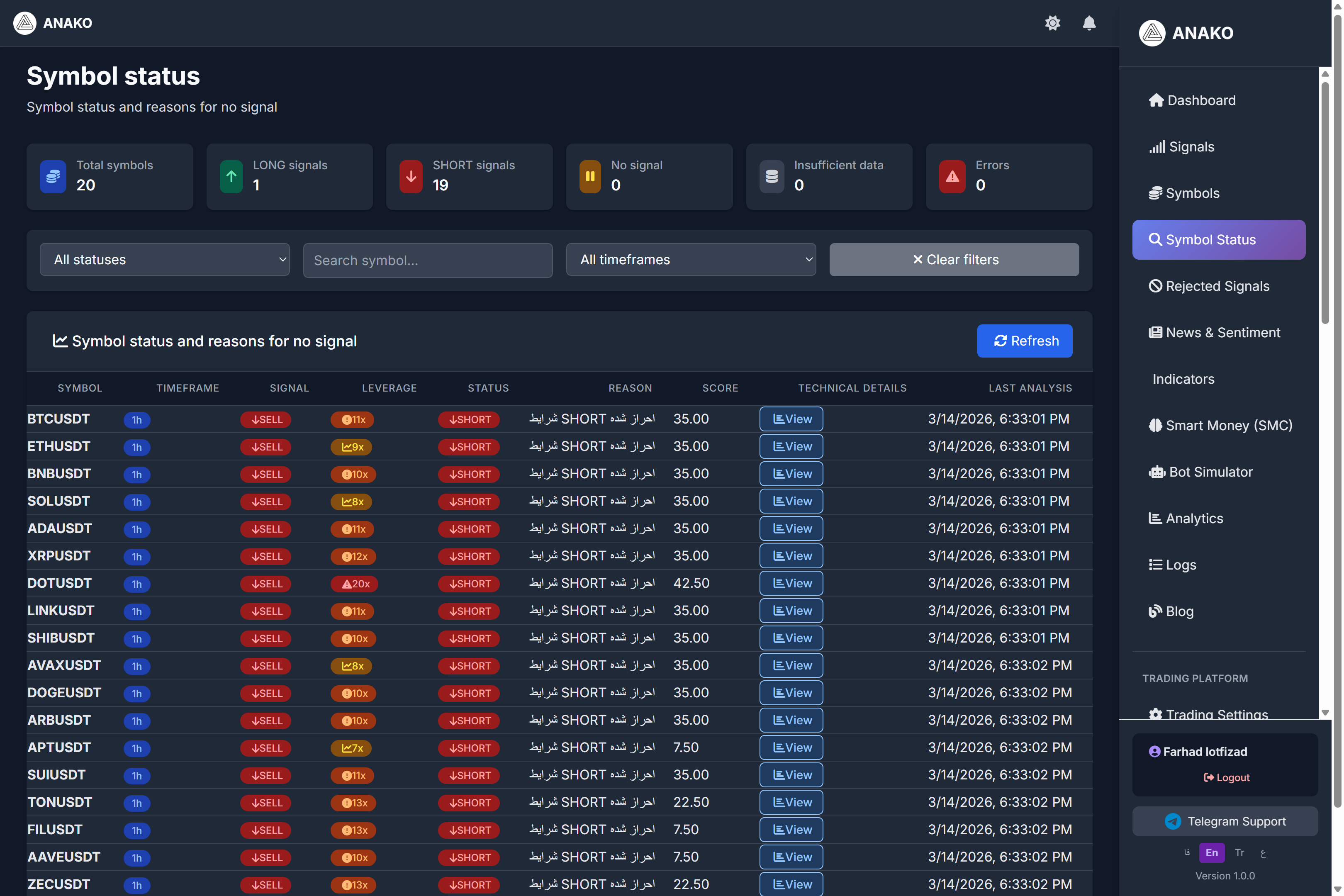
On the ANAKO AI Signal platform, only symbols with signals are displayed. The system also checks the status of all analyzed symbols and determines why signals have not been issued for some of them.
This feature can be viewed in the currency status section.
This section helps traders understand whether the market conditions are suitable for trading or not.
What is the Currency Status Page?
On the currency status page, the status of all symbols reviewed by the system is displayed.
This section specifies:
-
Which symbols have signals
-
Which symbols do not meet trading conditions
-
The reason why signals were not issued
This information helps users have a clearer picture of the market status.
Overall Market Information
At the top of the page, several general indicators are displayed.
Total Symbols
The total number of analyzed symbols
Example:
20
LONG Signals
Number of buy signals
Example:
1
SHORT Signals
Number of sell signals
Example:
19
No Signal
Symbols that do not meet entry conditions.
Insufficient Data
Symbols that do not have enough data for analysis.
Errors
If an error occurs during analysis, it is displayed in this section.
Filtering Symbols
At the top of the table, it is possible to filter the data.
Users can search for symbols based on the following criteria:
-
Status
-
Symbol
-
Timeframe
This feature helps traders find their desired symbol more quickly.
Symbols Status Table
Important information for each symbol is displayed in the main table of the page.
Symbol
Trading symbol such as:
BTCUSDT
ETHUSDT
BNBUSDT
Timeframe
The market analysis timeframe.
In the example above:
1H
Signal
The market’s suggested direction.
In this example, most symbols are in the status:
SELL
are located.
Leverage
The offered leverage for the trade.
Example:
11x
9x
8x
This amount is determined by the system's risk management algorithm.
Status
The current status of the analysis.
Example:
SHORT
This means the system has identified the market structure as bearish.
Reason (Reason for not issuing a signal)
One of the most important columns in this table is Reason.
In this section, the system explains why an active signal has not been issued for that symbol.
For example:
"SHORT conditions have been met"
Meaning the market has a bearish tendency but the entry conditions may not yet be fully met.
Score
The system calculates an analysis score for each symbol.
Example:
Score
35
The higher the score, the higher the probability of issuing a signal.
Technical Details
In this section, the user can view the details of the technical analysis.
By clicking on the View option, more information about the market analysis is displayed.
Last Analysis
This column shows when the last market analysis was conducted.
Example:
3/14/2026
This indicates the system continuously monitors the market.
Why is this section important?
The Symbol Status section helps traders:
-
Understand when the market conditions are suitable for trading
-
Avoid entering weak trades
-
Better comprehend the system's analysis
-
View the overall market status
Conclusion
The Symbol Status section is one of the professional features of the ANAKO platform that ensures users only enter trades when market conditions are suitable.
This system continuously monitors the market and analyzes data in an attempt to identify the best trading opportunities.